Quick answer
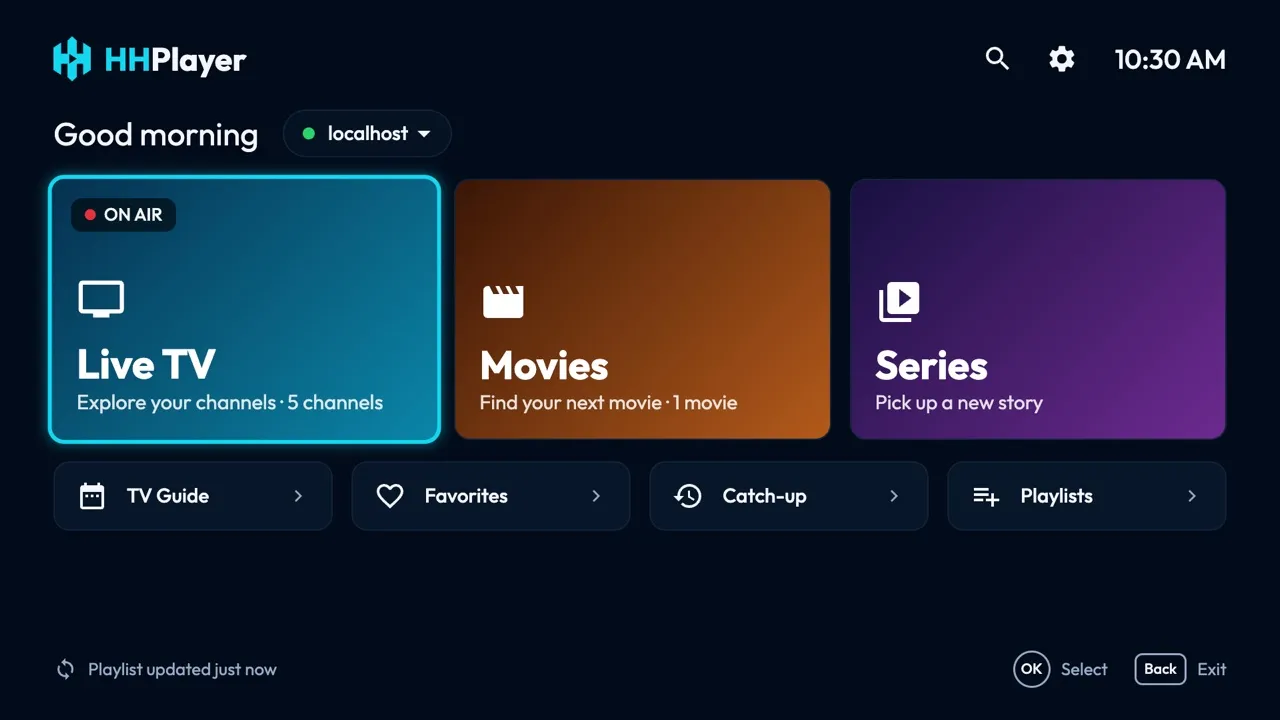
If you want a Mac app made for IPTV, with live channels, a TV guide, catch-up, movies and series in one place, try HHPlayer for Mac: it is free, has no ads or account, and runs on macOS 14 Sonoma or later. If you only need to open a playlist now and then, VLC or IINA will do. Kodi suits people who want a full media center and don’t mind setting up add-ons.
One thing applies to every app below: none of them includes channels or playlists. You bring an M3U link or an Xtream Codes login from a provider you are entitled to use. This comparison is as of November 2026.
What to look for in an IPTV player for Mac
- Playlist and login support. Can it take an M3U link and an Xtream Codes login (server, username, password)? See M3U vs Xtream Codes for the difference.
- A real TV guide (EPG). A grid showing what is on now and next, built from the provider’s XMLTV data. More in TV guide, EPG and catch-up explained.
- Catch-up. Restart a programme or watch a past one, when your provider offers an archive.
- Movies and series. Seasons, resume where you stopped, next episode starting by itself.
- Keyboard and trackpad comfort. Channel number keys, search, quick switching between channels.
- Several playlists. Useful if you have more than one subscription or a family setup.
- Privacy and price. Ads, accounts, and where your playlist is stored.
The players compared
HHPlayer
Built for IPTV. It handles M3U links and Xtream Codes logins, shows live TV by category with favorites and a live preview while you browse, and has a full TV guide grid from your provider’s XMLTV data. When your provider offers an archive or Xtream timeshift, you can restart a programme or watch it later. Movies and series have seasons, resume and next-episode autoplay; audio and subtitle choices are remembered. Since version 1.0.9 you can also play a second channel in a small corner window on Mac, swap the two and choose which one has the sound. You can also search across channels, movies and series, keep several playlists that refresh automatically, and set a parental lock. It is free, with no ads, no account and no in-app purchases; playlists and history stay on your Mac. See all features.
VLC
The well-known free, open-source player for macOS, Windows and Linux. It opens M3U playlists as a list of streams and plays almost any format. It is a general media player, so it is not organised around channels, a TV guide grid or series resume. A good, simple choice for opening a stream.
IINA
A free, open-source player for macOS built on mpv, which needs macOS 12 or later according to its website. It has a modern Mac interface. It presents itself as a general video player rather than an IPTV app, so check that it covers the playlist features you need.
Kodi
A free, open-source media center. For IPTV it uses the PVR IPTV Simple Client add-on, which reads an M3U playlist and an XMLTV guide and supports several catch-up modes. It is very flexible, but you configure it yourself, and the add-on handles Xtream as a catch-up mode rather than a login screen. Best for people who like to tweak.
Smarters Pro
The current app from Tech Smarters, widely known as IPTV Smarters. Its website lists a macOS version, but as of November 2026 it is marked v1.0, beta, next to Windows. The site lists parental control, multiple playlists, an EPG, picture-in-picture, Chromecast and a search across movies, series and live TV. Smarters is better known on Android, iPhone and Apple TV (HHPlayer has no iPhone, iPad or Apple TV app, so if you need those, Smarters is an option worth a look); see our HHPlayer vs IPTV Smarters comparison. When searching for it, check that the developer is Tech Smarters, since many look-alike apps use similar names.
GSE Smart IPTV Pro
A paid Mac-only app. Its Mac App Store listing, as we read it in November 2026, shows a price of $5.99 in the US, support for Xtream Codes, local and remote M3U and XMLTV, an EPG timeline, recording and parental control. The listing’s latest version, 4.4, dates from May 2022, so check the store page for current details before buying.
Comparison table
| Player | Cost | What it is | Good for |
|---|---|---|---|
| HHPlayer | Free, no ads | IPTV app for Mac | TV guide, catch-up, series, second channel |
| VLC | Free | General media player | Opening an M3U link quickly |
| IINA | Free | General player built on mpv | A clean Mac interface for streams |
| Kodi | Free | Media center with a PVR add-on | Tweakers who want full control |
| Smarters Pro | See the store pages | IPTV app; macOS version listed as beta | Using the same app on other devices |
| GSE Smart IPTV Pro | Paid (check the listing) | Mac-only IPTV app | Recording; check how recently it was updated |
How to install HHPlayer on a Mac
- Download HHPlayer-mac.dmg from the Mac page and open it.
- Drag HHPlayer into your Applications folder and open it. HHPlayer isn’t signed by Apple yet, so macOS may say it can’t verify the app. Open System Settings → Privacy & Security, scroll down and click Open Anyway. You only do this once.
- Add your playlist: paste your M3U link or enter your Xtream Codes login.
- No provider yet? Try the demo playlist to see how the app works.
The Mac app checks for updates itself. For VLC, IINA and Kodi, download them from their official websites. Ask your provider for the M3U link or Xtream details if you don’t have them.
Tips for smooth IPTV on a Mac
- Use a good connection. Wired Ethernet or a strong Wi-Fi signal avoids most buffering, whatever player you use.
- Keep your playlist link private. It identifies your subscription, so don’t paste it in public places.
- Check the guide data. The TV guide only appears if your provider supplies XMLTV data, and catch-up only works when the provider keeps an archive. If a channel has no guide, that is usually a provider matter, not a player bug.
- Try before you commit. Test the player with the demo playlist, then add your own.
- Need help? The support page covers common questions.
Our verdict
For a Mac user who watches live TV, movies and series every week, a dedicated app is more comfortable than a general player. HHPlayer is free, takes both M3U and Xtream, and includes a TV guide, catch-up and a second channel. VLC remains a fine tool for a quick test, and Kodi is rewarding if you enjoy configuring. We make HHPlayer, so judge for yourself: it costs nothing to try.
Also on Windows? Read the best IPTV player for Windows. HHPlayer is a media player and includes no content: use a playlist from a provider you are entitled to use.
Questions and answers
Can VLC play an M3U playlist on a Mac?
Yes. VLC is free and opens M3U playlists as a list of streams. It is a general media player, so a grid-style TV guide, catch-up and Xtream login are not what it is built around.
What is the best free IPTV player for Mac?
It depends on what you need. VLC, IINA and Kodi are free general players. HHPlayer for Mac is a free app made for IPTV, with a TV guide, catch-up and series resume, and no ads or account.
Do I need Xtream Codes to use an IPTV player?
No. Most providers give either an M3U link or an Xtream Codes login (server, username, password). HHPlayer accepts both. See M3U vs Xtream Codes.
Is IPTV legal?
The player is legal software. Whether watching is legal depends on the content and the provider. HHPlayer includes no channels or playlists, so use a provider you are entitled to use.
Which macOS version does HHPlayer need?
macOS 14 Sonoma or later, on Apple Silicon and Intel Macs.